v0.19.5 · 29 October 2026
-
Automated Miner has an output again. The alternate recipe’s card showed inputs but no
Portable Miner coming out: its product is the one item in the game named unlike every other,
and the data import skipped it. Reported by Dave1nator (#120).
-
Pipe a byproduct back into the machine that made it. A belt can now be dropped on the card
it was dragged from, so an Encased Uranium Cell blender can take its own sulfuric acid back.
The maths already handled the loop; only the drop was refused. Reported by ToRxEdition
(#121).
-
Wiki: how the Ranker scores. What a tier means, what goes into the number, why a favourite
can land in A, and how to weigh it your way. Prompted by diRt (#123).
v0.19.4 · 14 October 2026
A pass through the feedback board: two things you had been waiting on, and four new reports.
-
Big auto-plans no longer lock up the page. Routing the belts of a ten-product factory
took the browser over a second for every change, and a larger one stopped responding
altogether. The belt router now only looks at what is near each belt instead of everything on
the canvas: the same factory routes in a tenth of the time, with the exact same lines.
Reported by ScienceofDishwashing (#118).
-
Balance no longer breaks the Alien Power Matrix chain. Three of its recipes give off Dark
Matter Residue and only the crystal recipe uses it, so some residue had nowhere to go, the
whole loop stalled at zero and its belts were removed as dead. Auto-plan now places a sink
for any byproduct the plan cannot use, and the chain runs. Reported by snotblow
(#113).
-
Fit the clock to whole machines. When the plan asks for 0.92 of an extractor at 250%, the
⚙ panel’s Clock row now offers “Fit 1 @ 229.69%”: one press rounds up to whole machines and
underclocks them so they make exactly the rate the plan needs. Works on machines and on
miners and pumps alike. Reported by Leon01 (#117).
-
Decide how a factory’s output splits. Click a link between two factories and type “Send
at most” to cap that belt; whatever it refuses goes to the other factories on the same item.
Leave it blank and the split works as before. Reported by shirokonoe (#116).
-
No more shadow links. When a factory stopped making something it was linked out, the line
vanished while the receiving card kept a 0/min input you could neither explain nor delete.
The link now stays on screen, drawn as a broken red line at 0, and its menu tells you why.
Reported by Sramsa (#115).
-
The summary panel no longer hides under Share and Collaborate. A tall summary’s last rows
sat behind the buttons in the corner; the panel now stops above them. Reported by
dan_croofers (#104).
v0.19.3 · 14 September 2026
Belts between factories now carry what the factory at the other end actually asked for. Five of
you reported this from five different angles, and it turned out to be one corner of the code.
-
A factory takes what it needs, not everything on the belt. Link a smelter line making 2000
ingots to a factory whose machines want 1100 and it used to swallow all 2000. It now takes
1100, and the other 900 stays on offer for the next factory you link. Two factories drawing
from one line each take their own amount instead of splitting it down the middle. Reported by
AcuteCascade (#91), HootHouse (#103) and sevil83
(#106).
-
Two factories making the same thing finally add up. 500 ingots from one mine and 1000 from
another now arrive as 1500. Before, the second link quietly replaced the first, so you could
never get past the bigger of the two. Reported by popthe (#94) and baum0372
(#111).
-
A mine sizes itself to the factories it feeds. An auto-sized miner had nothing telling it
how big to be, so it exported nothing and everything downstream starved. Linking it to a
factory is now enough: it builds to exactly what its consumers need. A miner you have pinned to
a rate still offers everything it can make, so nothing shrinks behind your back. Reported by
doolanabih (#107).
-
Every belt shows its own rate. With two factories feeding one, both lines used to be
labelled with the combined total. Each line now reads what it actually carries.
v0.19.2 · 23 August 2026
-
Choosing a save works in Chrome again. Chrome refused to open files from the folder the
game saves into (“can’t open files in this folder because it contains system data”), so the
new save picker never got past the dialog. It now uses a plain file chooser with no such rule.
Reported by Yoshy703Y within the hour, thank you. What you picked is read once and kept as
the instance’s parse; the browser cannot hold on to the file itself between visits.
v0.19.1 · 23 August 2026
-
Move a plan to another instance. Every plan on the list has a “Move to…” dropdown next to
its delete button; pick an instance and the plan files itself there. Handy now that plans from
before instances all landed under “My plans”.
v0.19.0 · 23 August 2026
Your save file, on the web. Create an instance, hand it your save, and the Ranker knows exactly
where your playthrough stands: which alternates you already have, which ones are sitting in a
hard drive at the MAM, and which of the two it is offering you is the better pick.
-
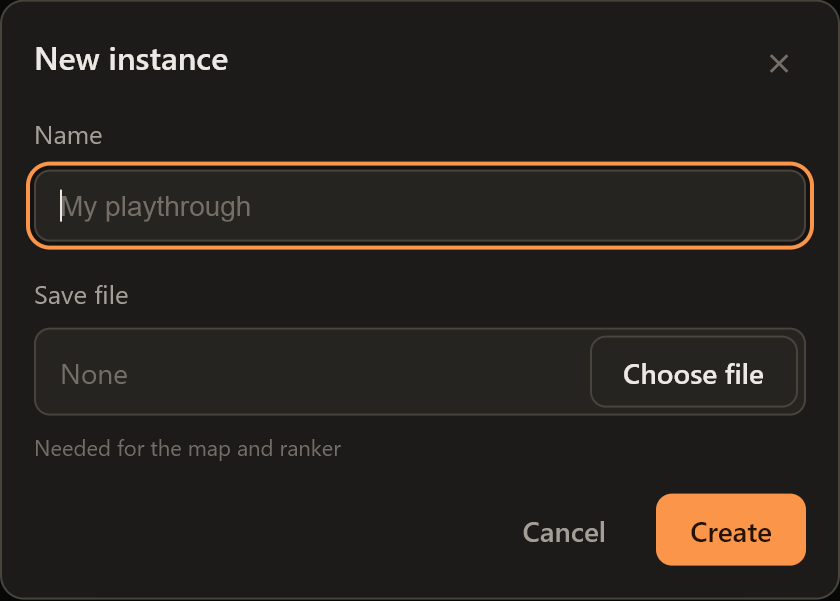
Instances come to the web planner. The rail’s Instance panel works exactly as it does on
the desktop app: an instance is a playthrough, it holds your plans, and it follows a save file.
Pick the .sav once from the New instance dialog; the planner reads it in your browser (nothing
is uploaded anywhere) and reads it again whenever the file changes. Plans you already had are
filed under a “My plans” instance, so nothing moves.
-
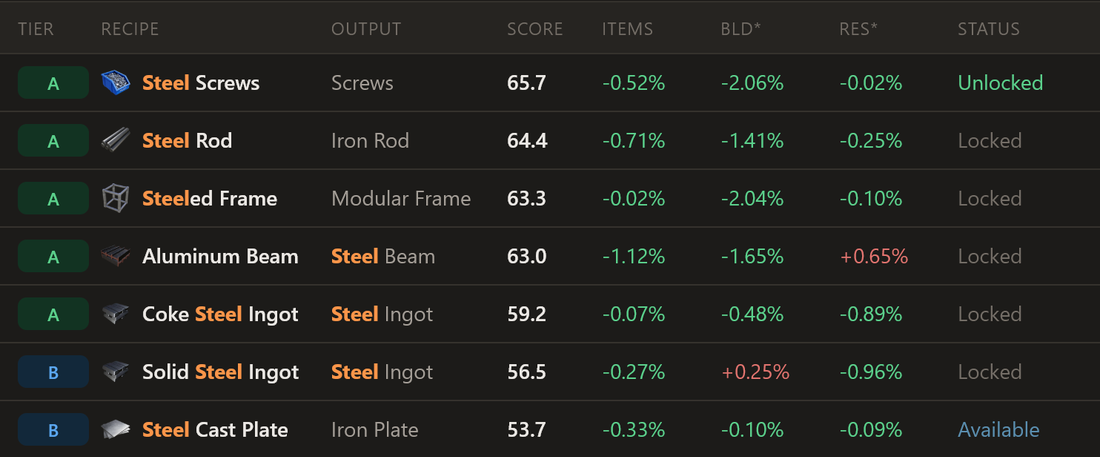
Three states in the Ranker, not two. Every alternate is now Unlocked, Available or Locked.
Available is the new one: the recipe is on a hard drive you have already scanned, waiting for
you to choose it. Unlocked comes straight from the save too, so the count at the top of the
table is the real one. The old scan counted recipes the game had merely shown you; this one
reads what you actually chose.
-
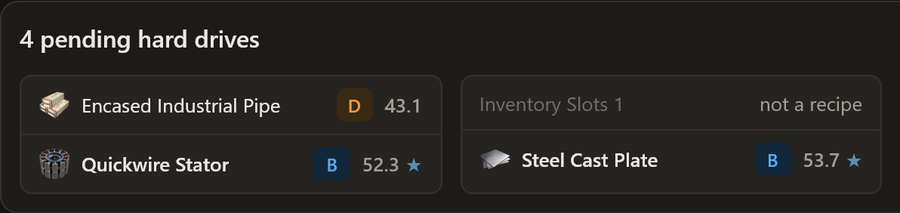
Pending hard drives, paired up. Each scanned drive offers two recipes and the game makes
you pick one. The Ranker now shows every waiting drive as a card with both choices side by
side, each with its tier and score, and a star on the one that scores higher under your current
weights. The “which of these two” question, answered before you walk back to the MAM.
-
The Ranker updates when you ask it to. Find a drive, pick a recipe, reroll a bad pair: the
save changes, and the table says so with an Update rankings button, but it does not reshuffle
under you while you are reading it. Click when you are ready.
-
Global config follows the save. A parsed save sets the unlocked alternates in the plan’s
Global config on its own, with a toast and an Undo in case you were planning ahead with a
manual list. Recipes you tick by hand per factory still win.
-
Splitters stop skewing belts they are not on. A priority belt anywhere in a factory could
pull a free fork elsewhere fully to one side (one wire assembler running flat out, its twin at
zero). Priority belts now only reroute flow on the fork they belong to; every other split stays
balanced. Reported through a stator and rotor factory, now solving 68.6 / 51.4 wire the way it
should.
-
A tidier rail. Notes sits under the sections, What’s new heads the bottom block, the
instance and feedback sections follow, and the account is a single row with your name.
v0.18.6 · 15 August 2026
-
Your notes now follow your account. The notes scratchpad (the Notes button in the rail)
used to live only in the browser you wrote it in. Signed in, your notes now save to your
account and sync across every device you use: write on the desktop, read on your phone. Notes
you already have move over by themselves the first time you open the planner signed in. Not
signed in? Nothing changes: notes stay private in your browser, and signing in later brings
them along.
v0.18.1 · 14 August 2026
Two fixes from the feedback board, both about the planner respecting what you meant.
-
A line with no anchor now says so. Turn on auto-size for every source feeding a line, with
no machine count or sink target anywhere on it, and the planner has nothing to size the line to,
so it solves to zero on purpose (the alternative is machine counts running off to infinity).
That zero used to arrive with no explanation, and the card’s tip actively pointed the wrong way.
The count readout now says “nothing sizes this line” and tells you exactly what to pin: a source
rate, a machine count, or a sink target. Reported as #92.
-
A typed source rate survives retuning the miner. Build the graph backwards, type “480 iron”,
then fix the miner to what you will actually build, and the tier, purity or overclock change
rewrote your 480 to one extractor’s output. A hand-entered rate is your number: it now stays
put, and the extractor-count readout moves instead (480 on Mk.1 is 8 miners; switch to Mk.2 and
it reads 4). A fresh source you never typed into behaves exactly as before.
v0.18.0 · 14 August 2026
Notes, in two shapes: a sticky note you pin to the canvas, and a scratchpad that follows you
around the whole app.
-
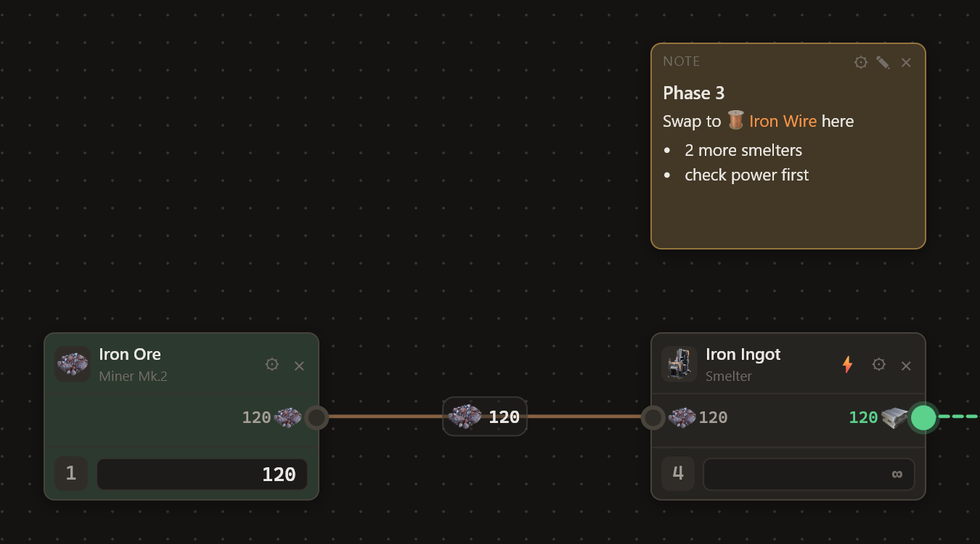
A Note node on the canvas. The palette’s utility rail (right-click the canvas) has a new
Note tile: a small card of markdown that lives among your machines. Write with the pencil, save
with the checkmark, pick a colour from the ⚙ swatches like any machine card. It moves,
multi-selects, copies and syncs to collaborators like a normal node, and it is invisible to
every number: no ports, no power, nothing on the build cost. Asked for on the board by
Dave1nator, with Yoshy703Y seconding the “just a text node” shape. This is exactly that.
-
A scratchpad for everything else. The rail’s new Notes button (or Ctrl+`) opens a floating
notepad that works anywhere in the app: planner, Ranker, wiki. Notes are markdown, stored on
this device, and survive across plans; the window drags, resizes and remembers where you left
it.
-
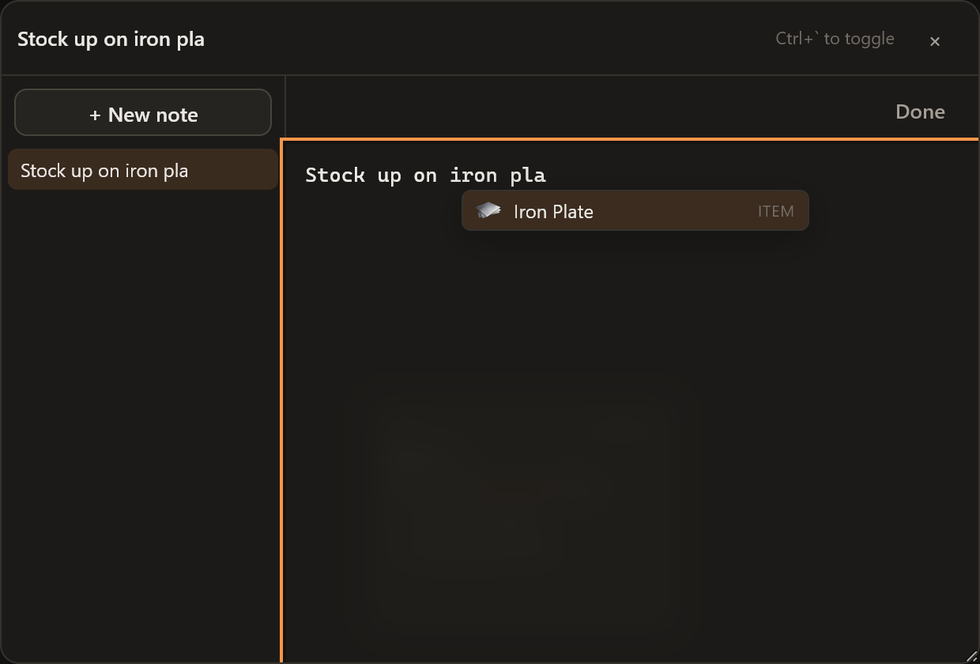
Type an item name, get the item. Both places complete as you type, VSCode-style: start
writing “iron pla” and a popup offers Iron Plate with its sprite; Tab or Enter drops in a link
to the item’s wiki page. Machines and alternate recipes complete too, and the link renders with
its item’s icon inline, so notes wear the same faces as the rest of the planner.
Everything here is annotation: none of it changes a solve, a rate, or a build cost. Your factory
maths is exactly as it was.
v0.17.0 · 14 August 2026
The Alternate Recipe Ranker is on the web. It has been a desktop-only feature since the beginning;
from today it lives in the rail next to the planner, at
pioneertoolbox.com/planner/ranker.
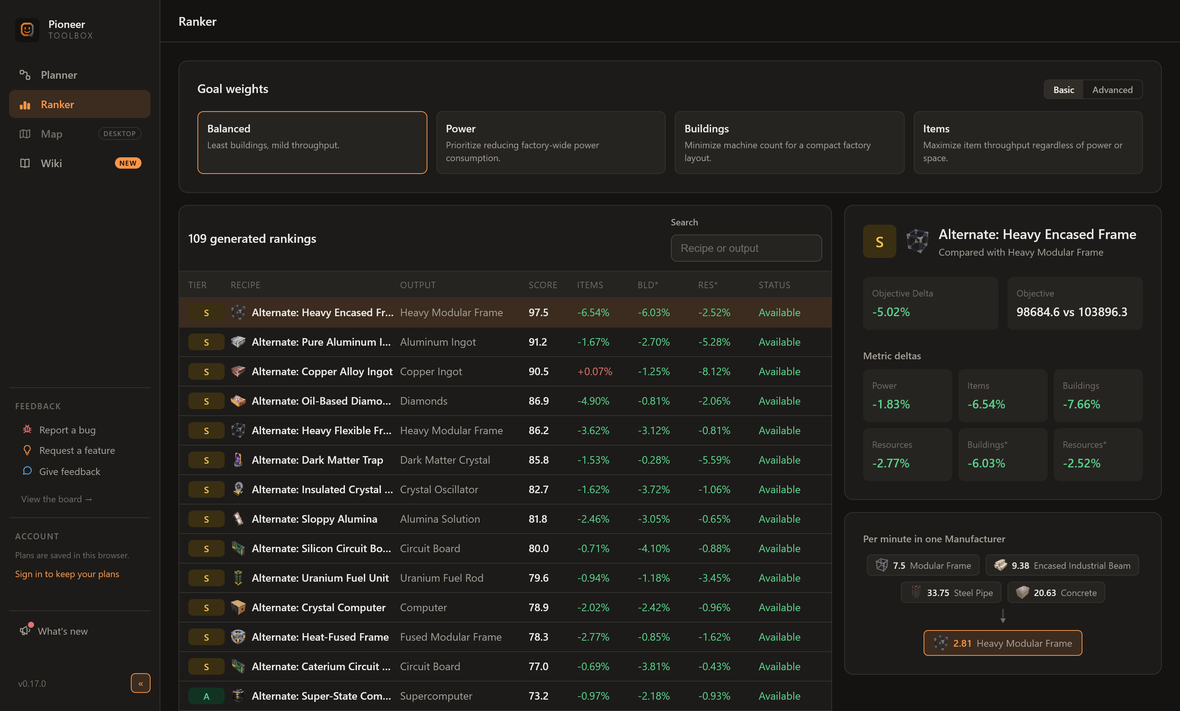
If the Ranker is new to you: it scores all 109 alternate recipes by forcing each one into a
whole-game production model and measuring what it actually saves, in machines, items, power and
resources, while every other recipe re-optimizes around it. No tier-list vibes, just the solver.
And it is the same solver: the desktop app’s Rust ranking engine now compiles to WebAssembly and
runs in your browser, so web and desktop produce identical scores, verified field for field.
What shipped around it:
-
The preset lenses got fixed, not just ported. Ranking by Power, Buildings or Items used to
slam most recipes to a 100 or a 0, so four of every five landed in S or F and the tiers said
almost nothing. The weighting maths was at fault and has been rebuilt: every preset now spreads
recipes across the whole board. The Power preset also ranks purely by power now, so the biggest
power saver in the game actually comes first under it, and the table’s delta column follows the
preset so the number that earned the rank is the one you see.
-
The table tells you where you stand. Every recipe row carries its product’s sprite, and the
header counts how far through the alternates you are (18/109 unlocked) based on the unlocked
alternates in your plan’s Global config. Declared nothing unlocked? Then everything shows Locked,
because that is what a fresh game looks like. The Ranker reads the plan you touched most
recently.
-
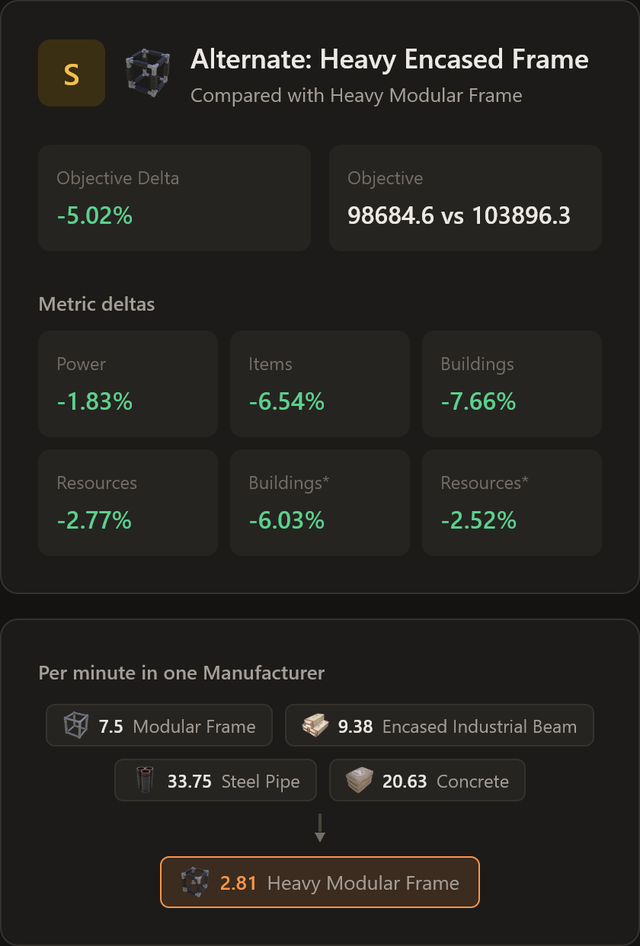
Each recipe explains itself. The breakdown panel shows the score’s metric deltas and the
recipe’s per-minute flow: what goes in, what comes out, in one machine at 100% clock.
Two smaller things:
-
The planner leads the rail on web and desktop both. It is where the time is spent; the
Ranker moved to second.
-
Overclocked miners now bill their Power Shards. v0.16.5 put shards on the Build cost list
(#89), but only for production machines; a line of 250% miners still claimed it needed none.
Extractors now carry theirs too, and a resource well is sharded once at its Pressurizer, the
same building its power lives in.
Heads up: because the preset maths changed, scores and tiers under the Power, Buildings and Items
presets are different from earlier desktop builds, on purpose. The default Balanced ranking is
untouched, to the decimal.
v0.16.5 · 11 August 2026
Three fixes from the feedback board. The theme this time: places where the planner
knew the right answer and then showed you something else.
-
Nitrogen wells work like every other well. A nitrogen well let you pick one purity, where
water and oil wells let you count the satellites you tapped at each purity. The rates were right
the whole time, which is why this read as the controls being odd rather than the numbers being
wrong. Underneath it there was a real arithmetic bug: a nitrogen site with a mixed purity was
sized by dividing its total by one assumed purity, so a site of four satellites could ask you to
build five. Your existing nitrogen sources pick up the satellite counts with nothing to redo.
Reported as #93.
-
Power Shards are on the shopping list. Overclock a machine and the shards it needs now appear
in Build cost, alongside the parts. They were always counted, but only on a line under Net power,
which is not where anyone looks for a shopping list: two people reported them missing before a
third found them. Reported as #89, and thanks to IanLee1521 for pointing at where they had been
hiding all along.
-
A source stops inventing a node purity. Hovering a resource well called it a “normal node”
while its satellite counts sat right underneath, open water claimed a purity it does not have,
and an external input read “External input · normal node” despite having no extractor at all.
Each of those now says what it actually is.
Heads up: a nitrogen well with satellites of mixed purity may show one satellite fewer than it
did, and a slightly smaller build cost with it. That is the real bundle you tapped arriving, not
something going missing.
v0.16.4 · 4 August 2026
One small fix people have been asking for, and one feature that shipped quietly a few
releases ago and deserves a proper mention.
-
Copy and paste works across factories. Copy a selection, go back to the plan view,
open another factory, paste: your machines arrive, belts and all, centred on wherever
you are looking. Until now the clipboard quietly emptied the moment you left the
factory, which made “move this line to my other factory” impossible. Requested on the
board as #55, #62 and #85.
-
Resource wells, since v0.16.1 and never announced. Oil, water and nitrogen can be
drawn from a resource well, not just the surface. A well source knows its site: you
give it the satellite counts by purity (pure / normal / impure) and it derives the
exact rate, satellite count and parts list from them, billing one Pressurizer for the
whole site because that is how the game does it. There is a
wiki guide if wells are new territory.
v0.16.3 · 31 July 2026
Three fixes from a read through the feedback board, all of them things people
had filed as suggestions rather than bugs. They were bugs.
-
A machine tells you what it needs before you wire it. Drop a Constructor on the
canvas and it used to show nothing at all until it had a belt on it, which two people
reported as the tool being broken. It now shows what its machines would take and make,
so you can size a line before drawing a single belt. Reported as #79 and #35.
-
Typing a machine count makes it stick. Related, and worse: a machine with no belts
on it had its count quietly reset to nothing the moment anything else in the factory
changed. Place a machine, type 32, touch another node, and your 32 was gone. It keeps
what you gave it now.
-
Overproduction is no longer painted as an error. A machine built bigger than the
plan needs had red input dots it could never clear, which reads as “your supply is
broken” when the honest answer is “nothing downstream wants this much”. Those dots are
now a muted dashed grey. Red still means starved. Reported as #70.
-
The full recipe name is reachable everywhere. Names elide on the node card and the
full one lives in the hover card, but on the top row of a factory that card floated off
the top of the screen. It flips below when there is no room above, and appears a little
quicker so it is findable at all. Reported as #42.
Heads up: because unwired machines keep their size now, a plan with machines you placed
but never connected will show a higher machine count and power draw than before. Those
buildings were always in your plan, they just were not being counted.
v0.16.2 · 30 July 2026
Two follow-ups to this morning’s release, both found by looking at real plans.
-
A machine that is idle now says so. Yesterday’s “a red input dot says which way
to walk” only spoke up when the trail ended at a pinned miner. If anything in between
was auto-sized, which is most factories, it went silent: red inputs, no explanation, on
a line with resources to spare. It now tells you the honest answer, which is usually
“nothing downstream wants more, raise the demand at the end of the line”.
-
A leftover input stops haunting the factory card. Link the wrong item into a
factory, delete the link, and a port could sit there reading 0 with no way to clear it
from the plan view. It clears itself now, and the factory config gained a delete on
linked rows so you can drop a requirement without deleting the link. Reported as #83.
v0.16.1 · 30 July 2026
A fixes release. Almost everything in it started as a report on the
feedback board, so if one of these is yours: thank you, and please yell if your
plan still misbehaves.
Somersloops now match the game ◆
The planner assumed every machine had four somersloop slots. Only the Manufacturer tier does, and
the difference was not small:
-
Slot counts are real now. Smelters and Constructors have one slot, Assemblers, Foundries,
Refineries and Converters two, Manufacturers, Blenders, Particle Accelerators and Quantum
Encoders four. The Packager, miners and generators take none, and the machine config only offers
the slots that exist.
-
Output amplification is per slot set, not per sloop. One sloop in a Smelter now doubles its
output like the game does. The planner used to say +25%.
-
Amplified machines draw real power. The game squares the boost: a machine with its slots
full pulls four times its base power for twice the output. Power summaries used to bill it at
only twice.
Heads up: your existing amplified factories will show new numbers, more output and a bigger
power bill. That is the game’s own math arriving, not a new bug. Sloops saved into machines that
cannot hold them (the old config allowed it) are simply ignored and no longer counted in the
shopping list.
Belts go where you pointed them 🎯
-
A priority splitter is an instruction. Its priority side fills until whatever is downstream
can take no more, and only then does overflow get the rest. Even when the priority side is a
container: your call, your belt. Reported as #65.
-
Buffers stop stealing from machines. A container on a fork takes what is genuinely spare
after the machines around it are fed, so no more watching stock pile up while an Assembler
beside it starves.
-
A red input dot now says which way to walk. Hover a starved input and it names the actual
bottleneck, like “Limestone (source)”, even when that pin sits four machines upstream. An idle
line reads as “waiting for demand” instead of pretending to be starved. Reported as #59, where
the mystery turned out to be a pinned limestone miner three hops away.
-
Balance keeps the recipe you placed. Put down Ficsite Ingot (Caterium) and press Balance:
it stays Caterium instead of flipping to Aluminum, and no duplicate producer sneaks in beside
it. A recipe you placed is a decision, not a suggestion. Reported as #48.
-
Packaging loops stopped printing fuel. With Recipe Parts Cost below 1, a pack and unpackage
pair could multiply fuel out of thin air (40/min in, 160/min out). The multiplier now only
touches the recipes the game itself scales, which excludes all packaging, so a loop conserves
exactly. Reported as #71.
Small fixes 🧹
-
Belts travel with a moved section. Move or copy a selection and the hand-routed belts inside
it come along instead of staying pinned to where the section used to be. Reported as #75.
-
Four items came out of hiding. The Alien Power Matrix, Rifle Ammo, Turbo Rifle Ammo and
Shatter Rebar had no name, icon or sink points because of how the game files them internally.
All four are whole again, and a new build check makes sure no item can go missing like that
again. Reported as #63.
v0.16.0 · 25 July 2026
Inputs and Outputs, for real 🔌
Factories can now declare explicit Input and Output nodes, so a multi-factory plan reads
like the supply chain it actually is.
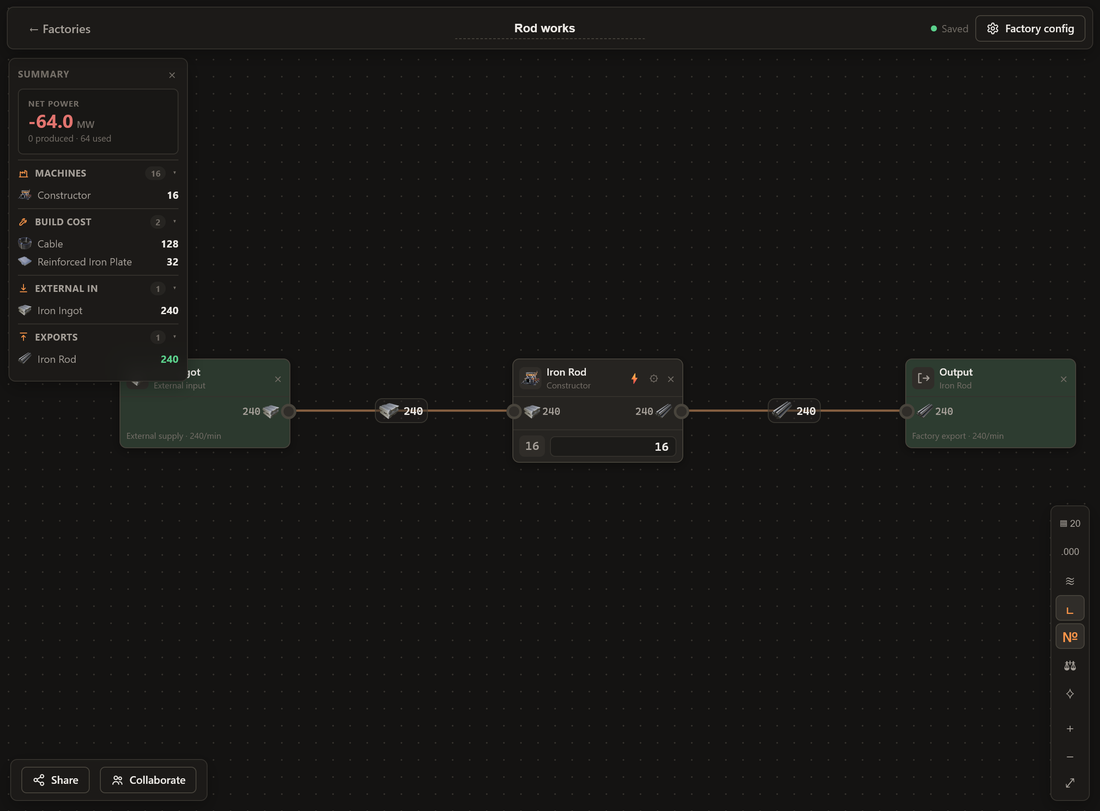
-
Output. Drop one on any belt inside a factory and it marks that flow as a real export. Link
it to another factory and only that flow counts, so a stray unfinished line never gets mistaken
for something you meant to ship.
-
Input. Drag from any machine’s input port and place a source sized exactly to what it needs,
ready to receive an external resource once it’s linked. When another factory already sends you
the item, it’s offered right at the top of both the right-click “Add node” menu and the
drag-backwards menu: “External input, 300/min available, from A Smelting.” One click wires it up.
-
Inputs are honest now. An Input runs on what actually arrives over its link, instead of
quietly assuming unlimited supply. It shows as a solid input port on the factory’s plan card, and
the card itself stays quiet: a constant stream has no machine count and nothing to configure,
just the arriving rate. Cap what the factory takes by typing the requirement in the factory
config.
-
Ores can be Inputs too. Pick Input for Iron Ore and you get a delivery from another factory,
not a miner: no extractor in the machine tally, no Portable Miners on the build list, and it
counts as external supply rather than mining. Your central mining outpost can finally feed the
whole plan.
-
Links respect what you typed. If a factory needs 1,000 Copper Ingots and its upstream
factory makes 2,000, the link now transports only the 1,000 it asked for, leaving the rest for
other factories on the same item. Deleting a link no longer wipes out the requirement you typed,
only the connection.
-
Factory overview cards now list their computed external inputs automatically, so you can see
what a factory still needs without opening it.
Power lines between factories ⚡
Factory cards on the plan view can now be wired into power grids: drag a card’s ⚡ port onto
another factory and an amber power line connects them.
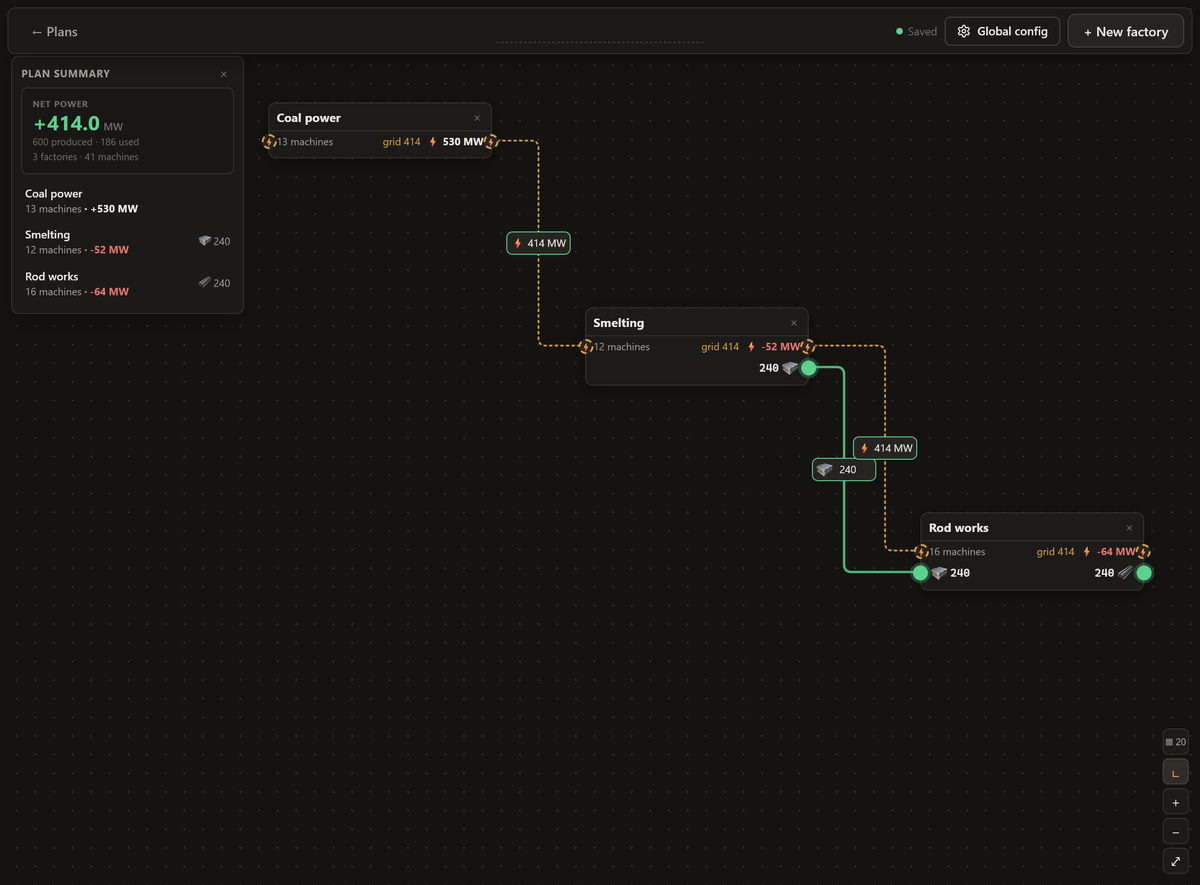
-
Every card has two ⚡ power ports, one on each edge, with the same dashed amber outline as the
wires: the left dot draws power in, the right dot feeds it out. Drag either onto another
factory; ports take as many wires as you like.
-
Each card on a grid shows its own net MW plus the grid total, so you can see at a glance that
your coal plant carries the outposts hanging off it.
-
The wire’s label shows the grid total too. Click it to disconnect.
-
Pure accounting, no items move: it answers “does this corner of my plan hold power-wise”, the
question the per-factory number alone couldn’t.
The plan view grew up 🗺️
-
A plan summary. The top-left panel leads with the plan’s total Net power, styled like a
factory’s own summary, with one compact row per factory: machines, net power, top exports, and a
warning count when inputs are still unsupplied. Click a row to jump in.
-
Ports look like ports. Factory cards’ inputs and outputs are drawn the same way ports look
inside a factory, with the same green supplied / amber declared / dashed missing states.
-
Grid snapping. Cards snap to the same grid as the factory canvases, with the grid control
next to the zoom buttons.
-
Links route like belts. Lines between factories are straight and right-angled now (or
curved, with the same toolbar switch as inside a factory), and their labels behave exactly like
belt labels: drag one to route the line, alt-drag to add extra anchors, ctrl-click to remove
one, click for options, double-click to reset. Parallel lines between the same two factories
keep their distance.
Smaller improvements 🧹
-
Tighter layouts from Tidy. Columns now stack by each card’s real height instead of a fixed
pitch, so storage rails and hub columns lose the dead air between rows.
-
Big plans stopped crawling. Factory solves are cached and cross-factory link syncing only
touches the factories a link actually involves, so editing one factory in a large plan no longer
re-solves all of them.
Fixed: a bottlenecked factory could blow up to a million machines 💥
If one machine in a factory had a hard limit (an Alien Power Augmenter capped at 10, say) and
everything else in the chain was left on auto, the planner could occasionally decide the rest of
the factory was unbounded and ride the solver to its internal ceiling: a byproduct chain reading
1,000,000 machines while the machine you actually limited sat at zero. Boundedness is now judged
per machine instead of per connected chain, so a limit on one machine can never license a runaway
somewhere else in the same factory.
Fixed: belts sharing a line, labels stacking 🧵
A follow-up to the belt router rebuild: two belts could still end up drawn on top of each other
under the right layout, and their labels could stack unreadably. Every belt’s mandatory port
approach is now reserved space before any routing happens, so two belts can no longer fight over
the same row, and a label that’s boxed in by a card can now slide along any straight stretch of its
own line to find a clear spot, not just the one it started on.
v0.15.2 · 23 July 2026
Fixed: forked belts starving each other 🔀
If a split fed a machine that split again further down the line (say, a wire belt forking into
both a Stator and a Steel Rotor line), the planner would sometimes dump everything into one branch
and leave the others empty, even though every machine was placed and wired correctly. Forks now
split evenly at every level, not just the first one.
v0.15.0 · 22 July 2026
A wiki for the planner 📖
There’s a new Wiki in the sidebar: everything the planner does, written down, plus a reference
for every item, machine and recipe in the game.
-
Guides that start from zero. A five-minute quick start builds a working iron line from nothing,
then the guides go deeper on nodes, belts, splitters and mergers, auto-plan, tidy layout, power,
linking factories, sharing and more.
-
A reference for the whole game. Open any item to see what makes it and what it feeds, any
machine for its power draw, build cost and recipes, or any recipe with its per-minute rates. It is
built from the same data the planner solves with, so it never drifts from what you actually build.
-
Search across all of it. Press
/ anywhere in the wiki to search the guides and the game data
together, so “where do I find X” is one keystroke away.
-
Part of the planner, not a separate site. Same sidebar, every page a real link you can share,
and it costs the planner nothing to load until you open it.
Small fixes 🧹
-
Number fields, checkboxes and scrollbars now render dark instead of flashing a light-grey box.
-
Opening a guide starts you at the top of the page, rather than wherever the last one left off.
v0.14.0 · 21 July 2026
Belts you can actually follow 🧵
The whole belt router was rebuilt around one rule: every belt is its own line, and you can trace it
with your eye. Two belts never share a stretch of line, so a number on the canvas always belongs to
exactly one belt.
-
No more belts riding each other. Two lines that used to overlap, or meet end to end and read
as one long belt carrying two different items, now keep their distance. Belts also route around
machine cards instead of drawing through them.
-
Forks split at one point. A belt feeding two machines, one above and one below, used to turn
at two slightly different columns and read like a broken stair. It now splits at a single point,
the way a real splitter would. Belts joining into one input meet at a single point too.
-
Belts leave and enter properly. A belt always leaves an output going right and enters an
input from the left, with a bit of straight line at each end. Feedback loops, like packaged water
going back to a refinery, now run around the outside of the cards instead of doubling back
through them.
-
Drag a label anywhere. Belt labels are the handles you route with, and the line now follows
wherever you drop one, including behind the source or past the target. With more than one handle
the belt draws a clean staircase through them rather than overshooting and doubling back.
-
Tidy builds your storage rail. Containers and sinks that just collect output used to get
mixed into the production columns. Tidy layout now lines them up in their own column on the
right, sink last: the arrangement you were probably making by hand anyway.
Nothing moves unless you move it ✋
Rearranging used to be a fight: nudging one label sent unrelated belts and labels hopping to new
lanes. Now the canvas holds still. Dragging something moves that thing and nothing else, even if it
ends up overlapping, and the layout is only ever recalculated when you press Tidy. Tidy is the
one moment everything re-optimises.
Faster on big factories ⚡
Two fixes for stutter on large plans. Panning and zooming no longer redraw the whole factory on
every frame, and the travelling item sprites are now budgeted, so a plan with a hundred-plus belts
stays smooth instead of animating hundreds of sprites at once. Smaller factories look exactly as
before.
v0.13.0 · 20 July 2026
What does this factory cost to build? 🔧
The factory summary now totals up every part you need to construct what’s on the canvas, the same
build list Satisfactory Modeler shows. No more counting machines by hand and looking up recipes.
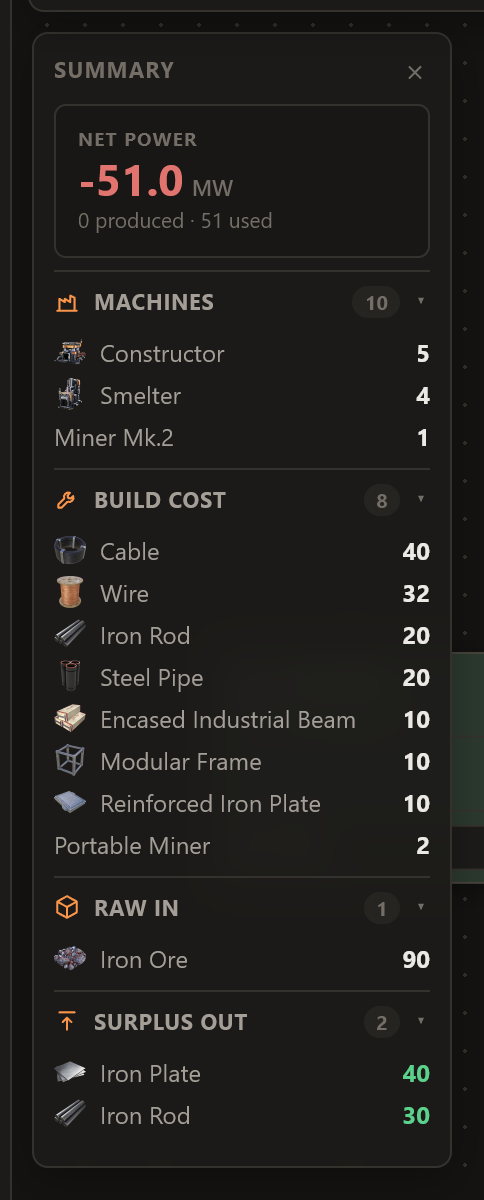
Open a factory and the Build cost section lists each construction part, with the quantity to build
everything placed: your machines, your generators, and the miners feeding your sources.
-
It follows your plan. Add machines, overclock, change recipes: the parts update with the
machine counts, so it’s always the shopping list for what you’ve actually got.
-
Game modes included. On a custom world, your Recipe Parts Cost already rebalances the machine
counts, and the build totals ride along with them.
-
Sorted biggest-ask first, so you can see at a glance what you’ll be hauling to the site.
v0.12.0 · 20 July 2026
Splitters and mergers 🔀
One of the most-requested things on the board is here: splitters and mergers, for planning
manifolds and branching your belts the way you’ll actually build them.
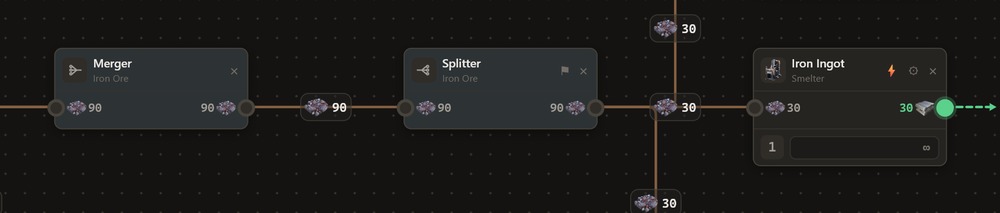
Right-click the canvas and there’s a new row of routing tools pinned along the bottom of the menu:
Container, Sink, Splitter, Merger. They’re on the drag-to-connect menus too, so you can branch a
belt straight out of the port you’re dragging.
-
Merger. Combine any number of belts carrying the same item into one line. Three refineries
feeding one output, sorted.
-
Splitter. Fan one belt out evenly across every line leaving it. Wire up three machines and each
gets an equal share, worked out for you.
-
The item locks to the first belt you connect, so a splitter or merger only ever carries one thing,
just like in game.
Priority splitters
Flip the ⚑ on a splitter and it becomes a priority splitter with two outputs.
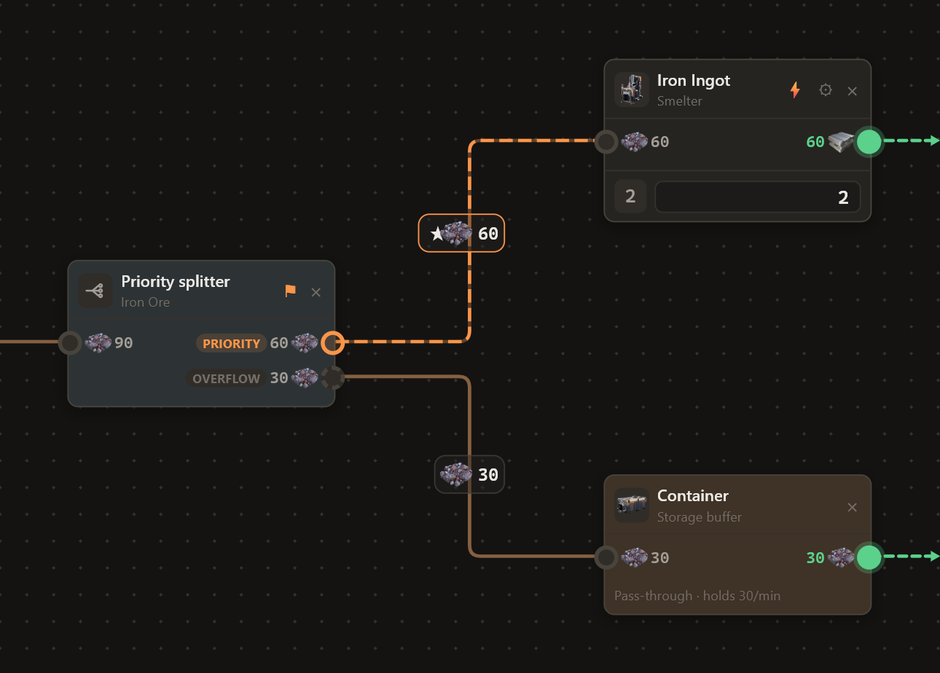
-
The priority output is filled first, right up to what its machines need.
-
The overflow output takes whatever’s left over.
Ideal for topping up a critical line before letting the surplus spill into storage or a sink.
v0.11.0 · 18 July 2026
Build the whole factory together, live 🎉
The most-requested feature since day one is here: real-time collaboration. Plan a factory with
your friends at the same time, in the same place, watching each other work.

Open any factory, hit Collaborate, and you’re instantly live. Copy the link, drop it in your
Discord, and whoever opens it lands right in your editor: the same canvas, the same belts, the same
Factory config. Not a stripped-down “shared view”, the real thing. You’re both just building.
-
Live cursors. Everyone gets their own named, coloured cursor. Watch a friend drag in a
Manufacturer and wire it up as it happens.
-
See what they’re working on. Whatever a teammate selects lights up in their colour, so you
never trip over the same node.
-
Everything syncs, instantly. Machine counts, clocks, recipes, the factory name, even the
config panel: change it on one screen and it’s already there on the other.
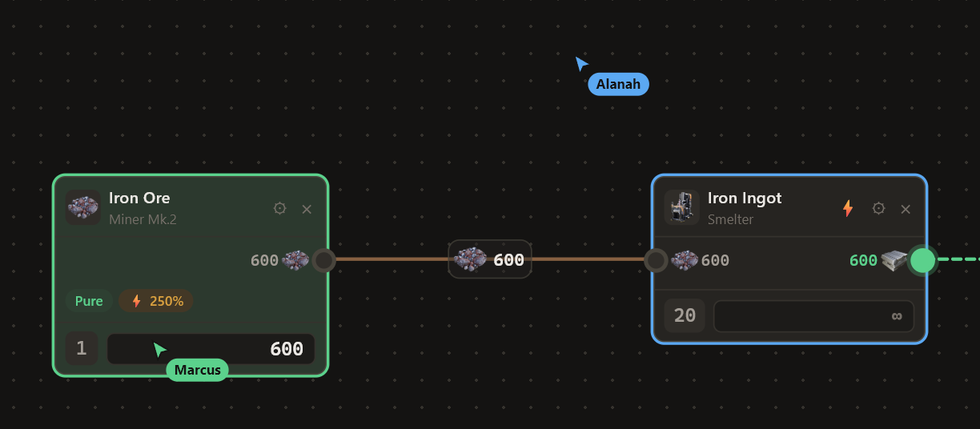
You stay in charge of the room. Remove someone from a session with one click (they can rejoin if you
send the link again), or revoke a link for good whenever you like.
Just want to show off a build? The Share button next to Collaborate hands out a read-only link
anyone can open, no account needed.
v0.9.0 · 18 July 2026
-
Share a factory with a link. Open any factory, hit Share, and you get a read-only link anyone
can open, no account needed. They see your factory exactly as you built it: every machine, belt and
rate, live. It stays view-only, so nobody can change your plan, and you can revoke a link any time
to switch it off.
v0.8.1 · 16 July 2026
-
Recipe Parts Cost now rounds like the game does. The game scales each recipe’s ingredient
counts and rounds to the nearest whole item (never below 1), per recipe, on purpose. We were
doing the “real” math on the ratio, so factories on modified worlds didn’t line up. They do now:
1 Magnetic Field Generator machine at 0.25× reads 1 Framework + 1 Control Rod, just like in game.
(Reported by IanLee1521. A great catch, with the exact numbers to prove it.)
v0.8.0 · 16 July 2026
Playing with 1.2’s custom game modes? The plan can match your world now.
-
Global config. A new button on the Factories overview holds your world’s game-mode settings.
Dial in the Power Consumption and Recipe Parts Cost multipliers and every factory’s numbers
fall in line with your game.
-
Unlocked recipes. Tick the alternates you’ve unlocked with hard drives. New factories then
auto-plan with just those plus the base recipes; the rest wear a 🔒 in the right-click build menu,
and you can still switch any on per factory to plan ahead.
-
Tidier checkboxes and number fields throughout.
v0.7.0 · 16 July 2026
A little housekeeping so it’s easier to keep up with what’s changing.
-
This panel. Release notes now pop up when there’s something new. Don’t want them? Tick “Don’t
show new changes” at the bottom and they’ll stay quiet; the dot on the megaphone still marks a new
update, and you can always open it yourself.
-
Coffee wall. Everyone who’s bought a coffee on Ko-fi gets a shoutout at the bottom of this
panel. Thank you, genuinely; it keeps the lights on.
v0.6.0 · 16 July 2026
The first batch straight from your feedback on the board. Thank you to everyone who filed one.
Fixed
-
Recycled rubber no longer kills the line. Oil → Plastic → Residual Fuel → Recycled Rubber went
grey and stopped calculating. It runs now, with the plastic it can’t use shown as surplus.
(Reported by sajt)
-
Splits are fair again. A three-way split from one machine used to send everything down a single
branch and starve the others. Each branch now gets its share. (Reported by Exitlol)
-
Machine counts on the plan board were counting cards instead of machines.
(Reported by Arineon)
New
-
Notes on nodes. Jot down “built ✓“, “needs 2 more belts”, or where it is on your map. A 📝
appears on the card. (Requested by AkharaKeth and Dave1nator)
-
Colour your cards. Six colours to mark progress at a glance; pair them with a note.
-
Decimal places. Choose how precise the numbers are, from 1 to 9 decimals, in the toolbar.
(Requested by Dave1nator)
-
Sink points. A Sink now shows the points/minute arriving, and the summary totals them all up.
(Requested by aleman)
-
Container fill rate. Containers show what they’re actually holding per minute.
(Requested by Zelcorat)
-
Hotkeys.
B balance, T tidy, F fit to view, +/− zoom. (Requested by Aswebee)
-
Drag from anywhere on a card, not just the title bar. Much kinder on a tablet.
(Requested by Raze1000)
-
Rates on the ports are on by default now.
Faster
-
Icons load instantly. The node palette used to take a second or two to fill in. Fixed.
-
Typing a note or dragging a card no longer stutters the belts.
v0.5.0 · 15 July 2026
A rebuild of the node cards around the number that matters.
-
The target is the star. Every card’s bottom row is a big editable field: machines, or parts per
minute; your choice, per node. No more digging through settings to change a value.
-
Machines N is always in the same place, so you always know what to build.
-
Settings live in the card, not a popup floating over your belts. Clock presets, a proper
overclock slider, four somersloop slots.
-
Hover a card for the full recipe: what one machine takes in and puts out per minute.
-
Sources show their extractor count again, and auto-size is back where you can find it.